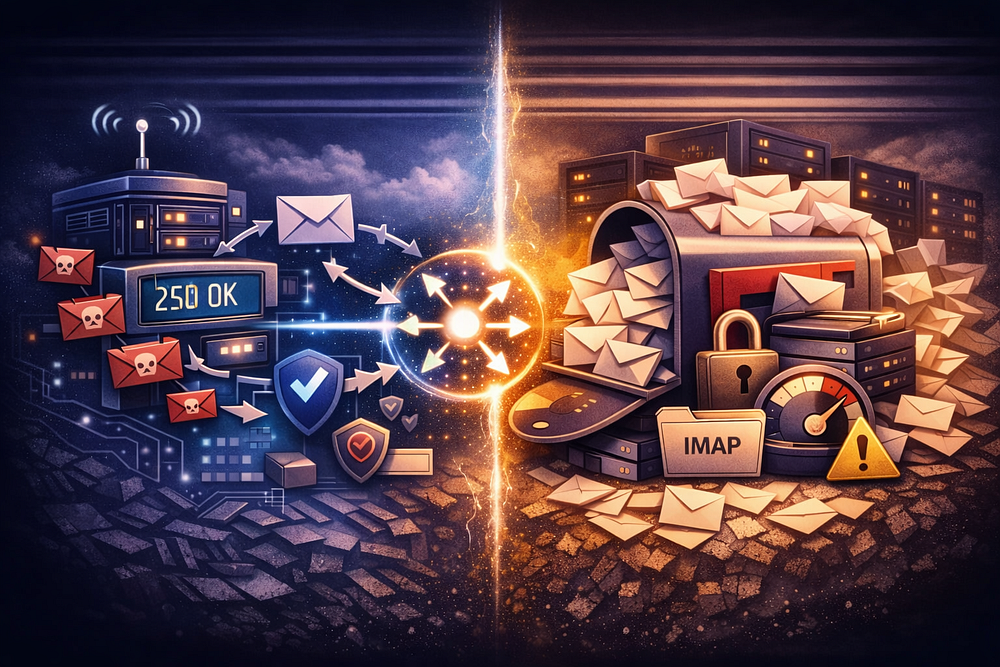
When you enable a “Catch-All” in your domain settings, you aren’t turning on a single feature. You are deploying two distinct architectural components that fight against modern email protocols: a Routing Policy (the Address) and a Storage Container (the Mailbox).
Conflating these two concepts is the primary reason admins lose control of their infrastructure. It leads to routing loops, broken authentication (SPF/DKIM failures), and security vulnerabilities that bypass edge filtering.
This guide deconstructs the mechanical difference between the catch-all address and the catch-all mailbox, explains the specific SMTP commands involved, and details how to architect this correctly without destroying your domain reputation.
For a broader analysis of the risks involved, read Catch-All Email: Why It Looks Simple — and Why It Becomes an Ops Problem (2026).
The Core Distinction: Policy vs. Container
To control email flow, you must separate the logic from the storage.
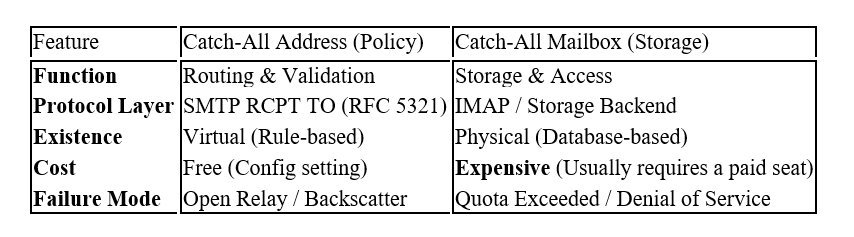
- The Catch-All Address (The Logic): This is a virtual rule at the SMTP gateway. It overrides the standard directory lookup. Instead of rejecting unknown recipients, it forces the server to accept the message.
- The Catch-All Mailbox (The Storage): This is the physical destination — a database on a disk with a quota, login credentials, and an inbox.
1. The “Address” is a Lie (The Routing Logic)
There is no such thing as a “Catch-All Address” in the directory. It is simply the absence of rejection.
In a standard secure email transaction, the receiving Mail Transfer Agent (MTA) validates the recipient during the SMTP handshake.
Standard Flow (Secure):
SENDER: RCPT TO: <ghost@yourdomain.com>
YOUR SERVER: 550 5.1.1 User unknown (REJECT)
Result: The connection closes. No data is transferred. The sender knows immediately that the address is invalid.
Catch-All Flow (Insecure):
SENDER: RCPT TO: <ghost@yourdomain.com>
YOUR SERVER: 250 2.1.5 OK (ACCEPT)
Result: Your server accepts the message payload.
The “Open System” Vulnerability
By switching from a “Closed System” (explicit users only) to an “Open System” (accept everything), you disable Recipient Validation.
This exposes you to Directory Harvest Attacks (DHA). Spammers will blast your domain with thousands of common prefixes (admin, invoice, david, sarah).
- Without Catch-All: Your server rejects 99% of this traffic at the edge with 550 errors.
- With Catch-All: Your server ingests 100% of it. You are now paying to process, scan, and store spam.
2. The “Mailbox” is the Liability (The Storage)
Once the policy accepts the message (the 250 OK), it must go somewhere. This “somewhere” is the Catch-All Mailbox. How you configure this determines your operational cost and risk profile.
Architecture A: The “Dumpster” (Dedicated Mailbox)
The only professional way to handle catch-all traffic is to route it to a dedicated, isolated mailbox (e.g., catchall-store@domain.com).
- Pros: Keeps junk out of production inboxes. Prevents “pollution” of search results for real users.
- Cons: On per-user platforms (Google Workspace, M365), this mailbox costs a full monthly license fee (e.g., $6–30/mo) just to store garbage.
- TrekMail Advantage: Because we use Pooled Storage, you can create a dedicated catch-all mailbox without paying for an extra seat. It simply uses a slice of your total storage pool.
Architecture B: The “Firehose” (Aliased to Admin)
The lazy approach is to map the catch-all policy directly to a primary user (e.g., the CEO or IT Admin).
- The Failure: This destroys the utility of the primary inbox. You cannot distinguish between a typo in a critical contract and a bot guessing admin@.
- Alert Fatigue: You will eventually stop checking the “Junk” folder because of the volume, causing you to miss the very emails you enabled the catch-all to save.
Architecture C: The “Black Hole” (/dev/null)
Some admins accept the mail (Policy) and then immediately delete it (Storage) to avoid storage costs.
- The Risk: If you configure this to “Accept and Bounce” (generate a Non-Delivery Report later), you create Backscatter. You are accepting spam from a spoofed sender and then sending a bounce message to the innocent victim. This will get your domain IP blacklisted.
- The Rule: If you don’t want the mail, Reject it at the edge (550). Do not Accept (250) and then Bounce.
3. The “Send As” Paradox (Identity Crisis)
The most significant operational gap between the Address and the Mailbox is Outbound Identity.
- Inbound: The Catch-All Address allows you to receive email sent to infinite variations (project-alpha@, billing-2024@).
- Outbound: The Catch-All Mailbox only has the identity of its primary login (e.g., catchall@domain.com).
The Scenario:
- A lead emails partnerships@yourdomain.com.
- It lands in the catch-all mailbox.
- You hit “Reply.”
- The customer sees From: catchall@yourdomain.com (or worse, admin@yourdomain.com).
The professional illusion breaks immediately. To reply as partnerships@, you must manually configure that specific alias on the mailbox. This defeats the purpose of a “dynamic” catch-all, as you are back to manual configuration for every active conversation.
4. Provider Implementations: The “How-To” vs. “How-Not-To”
Big Tech providers often obscure the distinction between Address and Mailbox to simplify the UI, leading to dangerous misconfigurations.
Microsoft 365 (Exchange Online)
Microsoft forces you to build the architecture manually. You cannot just “turn on” a catch-all; you must dismantle your security to make it work.
- Disable Security: You must set the domain to “Internal Relay”. This disables DBEB (Directory-Based Edge Blocking). Microsoft will no longer reject invalid recipients at the network edge; it must accept everything for processing.
- The Mailbox: Create a Shared Mailbox (e.g., catchall_store).
- The Address (Logic): Create a Transport Rule.
PowerShell Logic for the “Address”:
New-TransportRule -Name “Catch-All Routing” `
-FromScope “NotInOrganization” `
-RedirectMessageTo “catchall_store@domain.com” `
-ExceptIfRecipientBelongsTo “All_Valid_Users_Group”
Critical Warning: If you fail to maintain the All_Valid_Users_Group, the catch-all logic will steal mail meant for real users.
Google Workspace
Google hides the mailbox concept behind “Routing” settings.
- Navigate to: Apps > Google Workspace > Gmail > Default Routing.
- The Address: Specify “If envelope recipient matches pattern…” (or “Unrecognized / Catch-all”).
- The Mailbox: “Change envelope recipient” -> Replace with catchall@domain.com.
The Trap: If you map the catch-all to a Google Group (to save a license fee), you lose the ability to easily reply. If you map it to a User, you pay for the seat.
TrekMail (The Smart Operator’s Way)
We built TrekMail to handle this natively without the PowerShell gymnastics or security trade-offs.
- Toggle: Enable Catch-All in the dashboard.
- Route: Select the destination mailbox from a dropdown.
- Done
5. The Compliance Cost (GDPR & HIPAA)
When you enable a catch-all address, you lose the ability to claim “Data Minimization.”
- GDPR Article 5(1)©: You are collecting unsolicited PII (Personally Identifiable Information) from random senders.
- Right to Erasure: If a user demands you delete their data, how do you find it? Searching through a catch-all mailbox containing 500,000 spam messages is operationally impossible.
- HIPAA: If a patient typos an email and sends sensitive health info to docter@hospital.com, a catch-all accepts it. If that mailbox is accessible by IT staff, you have an unauthorized disclosure and a reportable breach.
Best Practice: If you handle sensitive data, disable the catch-all address. Let the sender receive a 550 Error so they know they made a mistake.
Conclusion: Stop Fighting the Protocol
Do not confuse the routing rule with the destination.
- The Catch-All Address is a gatekeeper decision: “Let everyone in.”
- The Catch-All Mailbox is the room where they all crowd together.
If you enable the address without securing the mailbox, you create a security vulnerability. If you secure the mailbox but misconfigure the address logic, you create a routing loop.
The TrekMail Solution:
We designed our platform for operators who need this flexibility without the complexity.
- For SMBs: TrekMail sets up the routing logic automatically. You get professional email hosting where aliases and catch-alls are handled instantly, so you don’t have to touch DNS or PowerShell.
- For Agencies: TrekMail applies this template to all your domains instantly. Manage 100 clients with a single flat-rate dashboard, ensuring every catch-all is routed safely without burning expensive per-user licenses.
Comments
Post a Comment