
Moving email infrastructure is not a file transfer. It is a state synchronization between two hostile databases that likely speak different dialects of RFC 3501.
If you treat an imap migration tool like a simple copy-paste utility, you will fail. You will lose read/unread status, you will duplicate gigabytes of data due to UID shifts, and you will hit API throttling walls that stall your cutover for 24 hours.
This guide defines the engineering requirements for a production-grade migration tool. We strip away the marketing claims of “zero downtime” and focus on the mechanics: resume logic, error handling, and forensic logging. For a deep dive into the protocol physics, read IMAP Migration: How It Works and How to Migrate Mailboxes Safely.
The Non-Negotiables: Engineering Requirements
A migration tool is only as good as its ability to handle failure. When evaluating software (whether it’s a CLI script like imapsync or a SaaS platform like BitTitan), these are the mandatory capabilities.
1. UID-Aware Resume Logic (The “UIDVALIDITY” Trap)
IMAP servers track messages using Unique Identifiers (UIDs). However, these UIDs are scoped by a value called UIDVALIDITY.
- The Risk: If the source server crashes, is restored from backup, or re-indexes a folder during migration, the UIDVALIDITY changes.
- The Failure Mode: A primitive tool sees this change, assumes the folder is new, and re-copies every single email. You end up with 100% duplication.
- The Requirement: Your tool must detect UIDVALIDITY shifts and handle them intelligently (e.g., by falling back to Message-ID hashing for deduplication) rather than blindly appending data.
2. Exponential Backoff (Throttling Management)
Cloud providers defend their infrastructure with aggressive rate limits.
- Google Workspace: Enforces a hard limit of ~2,500MB/day for IMAP downloads.
- Microsoft 365: Uses “Backpressure” and will return HTTP 429 Too Many Requests if you push too hard.
- The Requirement: The tool must recognize these specific error codes. It should not retry immediately. It must use Exponential Backoff — pausing for 5 seconds, then 10, then 20 — until the server lifts the block. A tool that hammers a throttled server will get your IP banned.
3. OAuth 2.0 Support (Basic Auth is Dead)
As of 2025, most major providers (Google, Microsoft) have deprecated or disabled Basic Auth (username/password) for IMAP access.
- The Requirement: The tool must support Modern Auth (OAuth 2.0). It needs to authenticate via a Service Account or an App Registration, not just a user password. If a tool asks for a password for a Google Workspace migration, it is obsolete.
4. Forensic Logging (CSV Output)
A progress bar is not a report. When a migration finishes with “Errors,” you need to know exactly what failed to determine if it’s acceptable loss (e.g., a corrupt 0-byte attachment) or a systemic failure.
- The Requirement: The tool must export a CSV log detailing:
- Source Folder vs. Destination Folder.
- Message Subject and Date.
- Specific Error Code (e.g., Message too large, MIME content error).
The “Nice-to-Have” Efficiency Boosters
These features prevent the most common “soft” failures — where the data moves, but the user experience is broken.
Folder Mapping (The Delimiter Problem)
IMAP servers use different characters to separate folders.
- Dovecot/Linux: Often uses dots (INBOX.Clients.ProjectA).
- Exchange/TrekMail: Uses slashes (INBOX/Clients/ProjectA).
- The Fix: Without regex-based folder mapping, a migration might create a literal folder named “INBOX.Clients.ProjectA” at the root level, destroying the user’s folder tree. The tool must auto-detect and translate these delimiters.
Exclusion Filters (The Gmail “All Mail” Trap)
Gmail projects labels as IMAP folders. A single email with three labels appears in three different folders. Additionally, [Gmail]/All Mail contains a copy of every message.
- The Fix: The tool must allow you to exclude specific folders (regex: ^\[Gmail\]/All Mail$). Failing to do this will double your storage consumption and migration time.
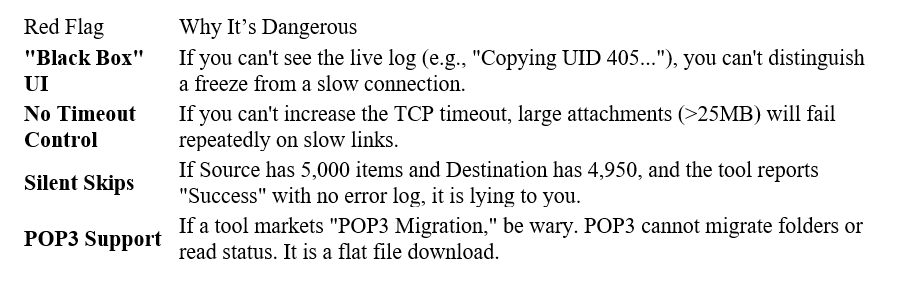
Red Flags: When to Abort
If you encounter these behaviors during your pilot, the tool is unsafe for production use.
How to Evaluate in 30 Minutes (The Pilot Protocol)
Do not commit to a migration window based on a sales brochure. Run a forensic pilot.
- Select a Test Mailbox: Choose a mailbox with at least 1GB of data, nested folders, and a mix of read/unread mail.
- Inject “Poison” Data: Deliberately place a >50MB file (if the destination limit is 50MB) and a message with a deep folder path.
- Run the Migration: Watch the logs.
- The Disconnect Test: Pull the network cable or kill the process at 50%.
- Resume: Restart the tool.
- Pass: It scans the destination, sees existing UIDs, and resumes transfer at 51%.
- Fail: It deletes the destination data or starts creating duplicates of the first 50%.
The TrekMail Advantage: The “Easy Button”
You can script imapsync yourself, manage the PID files, and grep the logs for errors. Or you can use a platform where the migration engine is part of the infrastructure.
At TrekMail, we built our migration tool to solve the specific pain points of moving from Big Tech suites to our pooled storage architecture.
- For SMBs: We automate the connection. You provide the source credentials (or OAuth token), and our system handles the folder mapping, the “All Mail” exclusions, and the exponential backoff logic automatically.
- For Agencies: When moving 100 domains, you don’t have time to configure regex maps for each one. TrekMail applies a proven template to bulk migrations, ensuring consistency across all tenants.
Note: TrekMail is an email-only platform. Our migration tool moves email (IMAP). It does not move Calendars or Contacts, as these are not part of the IMAP protocol.
Stop fighting DNS and debugging Perl scripts. Try TrekMail for free and experience professional email hosting built for operators.
Comments
Post a Comment