
Most IT professionals choose a mailbox migration tool based on the wrong metric: the marketing page. They look for “99.9% success rates” or “easy setup wizards.”
The reality is that email migration is not a file transfer; it is a forensic reconstruction of a database across two hostile servers that likely speak different dialects of IMAP. If you choose a tool that treats email like a simple file copy, you will face the “Monday Morning Nightmare”: duplicate emails, empty “Sent” folders, and users screaming because their unread flags have been wiped.
You don’t need a list of vendors. You need a rubric to evaluate the physics of the software you are trusting with your data. This guide provides a technical checklist to compare any mailbox migration tool — whether it’s a $15/seat SaaS or a free CLI script — against the harsh reality of IMAP Migration: How It Works and How to Migrate Mailboxes Safely.
The Core Criteria: What Actually Matters (The Physics)
When evaluating a tool, ignore the UI. Look at the engine. IMAP (RFC 3501) was designed for viewing mail, not bulk replication. A robust tool must handle the protocol’s inherent flaws and the specific constraints of modern providers like Google and Microsoft.
1. State Management (The UIDVALIDITY Trap)
This is the single most critical technical requirement. Every folder in IMAP has a UIDVALIDITY value. If the source server crashes, re-indexes, or is restored from backup during your migration, this value changes.
- The Risk: A primitive tool sees the new UIDVALIDITY, assumes it’s a completely new folder, and re-copies every single email. You end up with 100% duplication and double the storage cost.
- The Requirement: The tool must track migration state by Message-ID or Header Hash, not just the volatile IMAP UID. It must be able to deduplicate on the fly.
2. Namespace & Folder Mapping (The “Sent” Trap)
Source servers (like cPanel/Dovecot) often name the sent folder Sent Messages. Destination servers (like Exchange or TrekMail) expect Sent Items.
- The Risk: The tool copies Sent Messages as a custom folder. The user logs in, clicks “Sent,” and sees it empty. Their history is hidden in a subfolder they can’t find.
- The Requirement: The tool must support Regex Folder Mapping (e.g., ^Sent Messages$ -> Sent Items) to normalize names during the transfer.
3. Throttling & Exponential Backoff (The “429” Wall)
Microsoft 365 and Google Workspace enforce strict bandwidth limits.
- Google Workspace: Hard limit of ~2,500MB/day for IMAP downloads.
- Microsoft 365: Uses “Backpressure” and returns HTTP 429 (Too Many Requests) errors.
- The Risk: A tool that blasts data at max speed will trigger a lockout or a “User Suspend” event.
- The Requirement: The tool must detect throttling signals (HTTP 429, 503) and sleep automatically (Exponential Backoff), rather than marking the batch as “Failed.”
4. Authentication Modernity (The Feb 2025 Cliff)
Basic Auth (Username/Password) is dead or dying. Microsoft is retiring ApplicationImpersonation in February 2025.
- The Risk: Tools relying on legacy EWS impersonation or simple credential pairs will stop working for O365 sources/destinations.
- The Requirement: The tool must support OAuth 2.0 via App Registrations (Azure AD Apps or Google Service Accounts) to bypass legacy auth blocks.
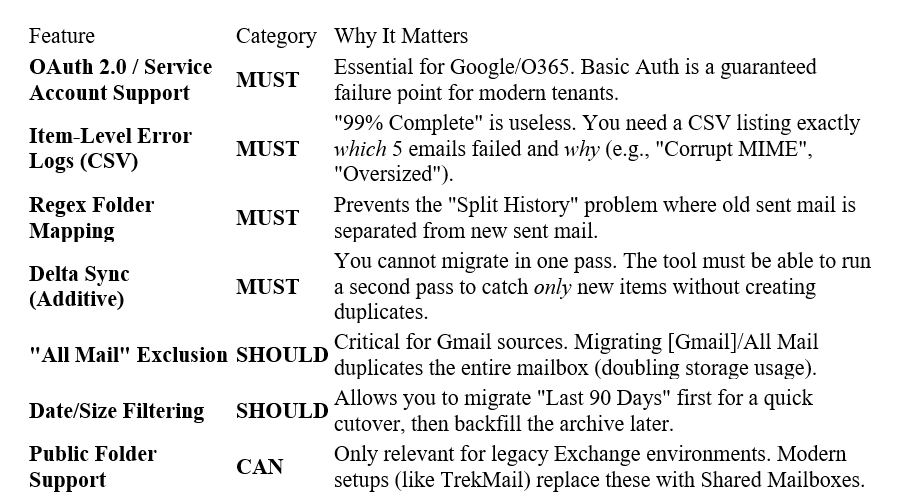
The Scoring Rubric: Must / Should / Can
Use this table to score any mailbox migration tool you are considering. If it fails a “Must,” walk away.
Decision by Scenario: Which Tool Fits Your Crisis?
Not all migrations are equal. The right mailbox migration tool depends on your volume, your margin, and your destination.
Scenario A: The “Surgical” Move (1–10 Mailboxes)
- Context: You are moving a small business or a VIP client. Data integrity is paramount; budget is flexible.
- The Approach: You need granular control. You cannot afford to lose a single flagged email or custom folder structure.
- Tool Type: CLI / Scriptable Tools (e.g., imapsync).
- Why: These tools allow you to map folders manually via regex and watch the logs in real-time. You can see exactly what is happening.
- The Cost: High skill requirement. $0 license cost.
Scenario B: The “Bulk” Move (100+ Mailboxes)
- Context: You are an MSP moving a mid-sized client. You need speed and automation.
- The Approach: You cannot babysit 100 terminal windows. You need a dashboard and parallel processing.
- Tool Type: SaaS Orchestrators (e.g., BitTitan, CodeTwo).
- Why: They handle the credential management, auto-provisioning, and parallel processing.
- The Trade-off: You pay a “per-user tax” (often $12–15/seat), which eats directly into your project margin.
Scenario C: The “Easy Button” (TrekMail)
If you are migrating to TrekMail, we render this decision irrelevant.
- For SMBs: We built the migration engine directly into our platform. You enter the source credentials (IMAP host, user, pass), and our system handles the folder mapping, [Gmail]/All Mail exclusion, and throttling automatically.
- For Agencies: You don’t pay per-seat migration fees. Whether you move 10 users or 1,000, the migration tooling is included in the flat-rate platform cost.
- The “Whale” Advantage: Because TrekMail uses Pooled Storage (e.g., 200GB shared across all users), you don’t have to worry about a 60GB “Whale” mailbox failing because the destination user only has a 50GB license. As long as the pool has space, the migration succeeds.
How to Compare Mailbox Migration Tools Without Guessing
Marketing claims are fluff. The only way to validate a tool is a Dry Run. Before you commit to a license or a strategy, execute this protocol on a single non-critical mailbox.
The Validation Protocol
- The “Sent” Test:
Configure the tool to migrate a test mailbox. Check the destination. Is the source Sent Messages content inside the destination Sent Items? If it created a new folder named Sent Messages, the tool failed the mapping test. - The “Ghost” Test (Item Count vs. Size):
Do not rely on GB size. A 10MB attachment on Linux might take up 13MB on Exchange due to MIME encoding overhead.
Count the items.
Source Inbox: 4,102 items
Dest Inbox: 4,102 items
If the destination has 4,100 items, check the logs. Did it skip corrupt items silently? Silent failure is unacceptable.
3. The “Delta” Test:
Run the migration. Send a new email to the source. Run the migration again.
- Pass: The new email appears on the destination.
- Fail: The tool re-copies the entire mailbox (duplication) or fails to see the new item.
Conclusion
The success of your project does not depend on the speed of the transfer; it depends on the fidelity of the data. A mailbox migration tool is only as good as its ability to handle the edge cases — the folder renames, the throttling limits, and the broken MIME headers.
If you are an MSP or a business owner, you have two choices:
- The Manual Way: Buy expensive licenses, configure complex regex maps, and babysit the logs all weekend.
- The TrekMail Way: Use a platform where the migration logic is built-in, automated, and free.
Stop fighting DNS and regex maps. Try TrekMail for free and let us handle the physics of the move.
Comments
Post a Comment