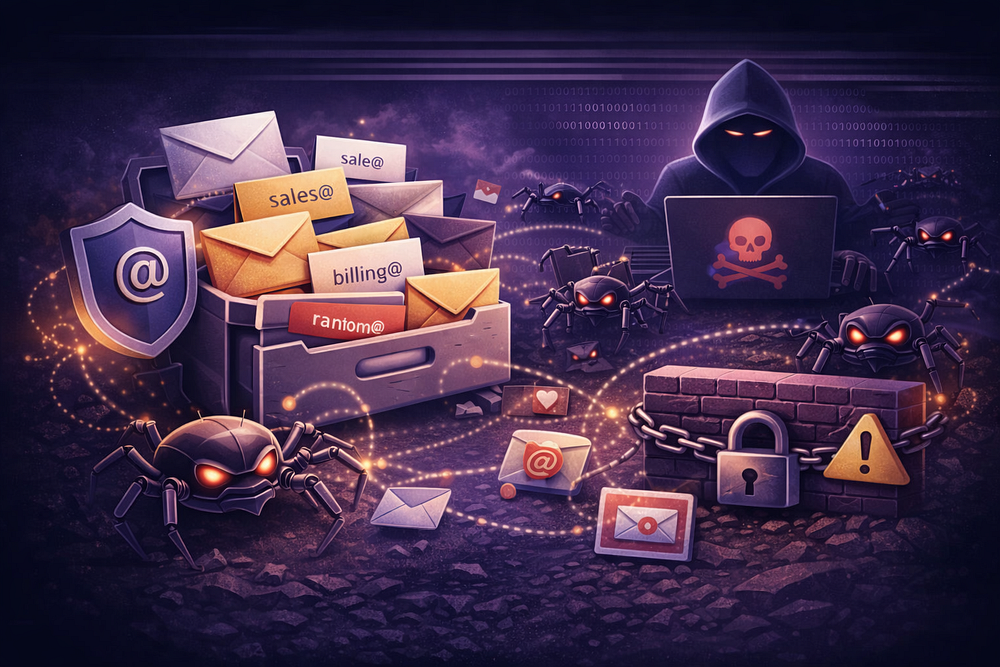
A catch-all (or “wildcard”) email address is a server configuration that accepts messages sent to any recipient at your domain, regardless of whether that user exists.
While often enabled by small businesses to catch typos (e.g., sals@ instead of sales@), it is technically an “Open Intake” policy. In 2026, enabling a catch-all transforms your domain from a secure, closed system into a target for Directory Harvest Attacks (DHA) and backscatter liability.
This guide details the SMTP mechanics of catch-all addresses, why they break modern authentication (SPF/DKIM), and how to architect your email system to avoid them. For a deep dive on the operational costs, read Catch-All Email: Why It Looks Simple — and Why It Becomes an Ops Problem (2026).
The Mechanics: Fail-Closed vs. Fail-Open
To understand the risk, you must look at the SMTP transaction (RFC 5321). The critical moment occurs during the RCPT TO command, where the sending server declares the intended recipient.
The Standard Setup (Fail-Closed)
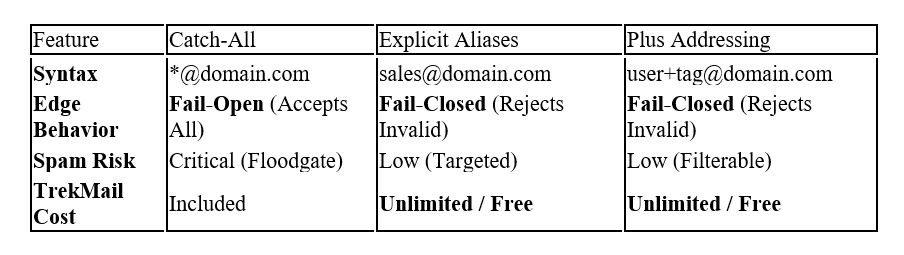
In a secure environment, your Mail Transfer Agent (MTA) validates the recipient against a local directory (LDAP, Active Directory, or user database) before accepting the message data.
SENDER: RCPT TO: <ghost@yourdomain.com>
YOUR SERVER: 550 5.1.1 User unknown (REJECT)
RESULT: Connection closes. No payload transferred.
Outcome: The sender receives an immediate bounce. Your server resources are preserved.
The Catch-All Setup (Fail-Open)
When a catch-all is enabled, recipient validation is bypassed. The server is configured to return a 250 OK status for every request, provided the domain matches.
SENDER: RCPT TO: <ghost@yourdomain.com>
YOUR SERVER: 250 2.1.5 OK (ACCEPT)
RESULT: Server accepts headers, body, and attachments.
Routing logic directs mail to a “bucket” mailbox.
Outcome: Your server ingests the data. You are now responsible for filtering, storing, and processing whatever payload was sent.
The 3 Operational Risks
Enabling a catch-all creates three specific vulnerabilities that degrade your infrastructure and domain reputation.
1. Directory Harvest Attacks (DHA)
Spammers and attackers use scripts to brute-force valid email addresses at a target domain. They blast thousands of common prefixes (admin, invoice, hr, david) to map your organization.
- Without Catch-All: The attacker sees a wall of 550 User unknown errors. They know the addresses don’t exist and move on.
- With Catch-All: The attacker sees 250 OK for every guess. They cannot distinguish valid users from invalid ones, so they flood your system with volume. This dilutes your “Signal-to-Noise” ratio, burying legitimate client emails under thousands of spam messages.
2. Backscatter (Reputation Suicide)
Backscatter occurs when your system accepts a message and then tries to bounce it later. This is the primary way legitimate domains get blacklisted.
- The Spoof: A spammer sends a virus to random@yourdomain.com but spoofs the MAIL FROM (envelope sender) as innocent@gmail.com.
- The Acceptance: Your catch-all accepts the message (because it accepts everything).
- The Bounce: Your internal antivirus or spam filter scans the payload, detects the virus, and rejects it.
- The Crime: Your server generates a Non-Delivery Report (NDR) and sends it to the spoofed sender (innocent@gmail.com).
To Gmail, it looks like you are attacking their user with unsolicited error messages. If this happens at volume, your IP will be listed on RBLs like ips.backscatterer.org.
3. The Forwarding Trap (SPF Failure)
Many operators combine a catch-all with auto-forwarding (e.g., routing *@company.com to a personal Gmail account). This breaks authentication chains.
- The New Hop: When you forward an email, your server becomes the new sender.
- SPF Break: Gmail sees the email coming from your IP, but the MAIL FROM domain is still the original sender (e.g., bankofamerica.com). The bank’s SPF record does not authorize your IP.
- The Drop: Unless you implement SRS (Sender Rewriting Scheme) and ARC (Authenticated Received Chain), Gmail will likely treat this as a spoofing attempt and silently drop the message.
The Financial Root Cause (And The Fix)
Most SMBs enable catch-alls to avoid the “Per-User Tax” of big tech suites.
- The Scenario: You need sales@, support@, and billing@.
- The Cost: On Google Workspace ($6/user), creating these as separate mailboxes costs $18/mo.
- The Hack: You create one user (admin@) and alias the rest via catch-all to save money.
TrekMail eliminates this incentive.
We use a Pooled Storage model. You pay for the storage capacity (e.g., 200GB), not the number of heads.
- The TrekMail Way: Create 50 distinct, legitimate mailboxes.
- The Cost: $0 extra.
- The Result: You get the security of “Fail-Closed” recipient validation without the financial penalty.
Alternatives to Catch-All
If you need flexibility, use RFC-compliant methods that do not compromise edge security.
For Agencies: The Bulk Template
If you manage 100+ domains, manually creating aliases is inefficient. TrekMail allows you to apply a “Standard Alias Template” (e.g., postmaster, abuse, accounts, info) to all domains in your agency dashboard instantly. This ensures professional coverage for every client without opening the catch-all floodgates.
The “Quarantine Sink” (If You Must)
If a catch-all is unavoidable (e.g., during a complex migration where legacy addresses are unknown), do not route traffic to a user’s inbox. Use a Quarantine Sink.
- Dedicated Mailbox: Create catchall-quarantine@yourdomain.com.
- Transport Rule: Configure the MTA to route unknown recipients to this mailbox.
- Suppress Alerts: Set a header or rule to mark these messages as “Low Priority” or “Spam” so they do not trigger mobile notifications.
- Review Cycle: Audit this mailbox weekly. When you find a legitimate email, create an Explicit Alias for that address immediately.
Summary
A catch-all email is a liability, not a feature. It trades a small convenience (catching typos) for a massive operational cost (spam floods, backscatter, and reputation damage).
Stop fighting the protocol.
If you are using catch-alls to save money on licenses, switch to a host that doesn’t tax you for having a professional structure. TrekMail gives you the freedom to create the mailboxes you need, securing your domain at the edge.
Comments
Post a Comment